 ShineDesk
GST billing software for your shop, on phone and computer
Make a bill in seconds, print it on a thermal or A4 printer, send it on WhatsApp and keep your stock right — from the ShineDesk mobile app or any web browser.
Free for 30 days or 20 bills. No card needed. How the free trial works
ShineDesk – The Ultimate Business OS
One Business. One Platform. Endless Possibilities.
Why settle for just billing software when you can run your entire business?
Most billing software stops at invoices, accounts or inventory. ShineDesk goes beyond billing. From your first customer inquiry to the final payment, it brings your daily business operations together in one powerful, easy-to-use platform.
Whether you run a retail store, supermarket, restaurant, service center, salon, workshop or many branches, ShineDesk adapts to the way you work.
Why choose ShineDesk over traditional billing software?
More than billing: a complete business OS
Stop juggling separate apps for billing, inventory, appointments, customer messages and reports. Manage everything from one connected platform.
Lightning-fast billing
Create professional GST invoices in seconds, with fast POS billing, barcode scanning, quotations, payment tracking and flexible printing.
WhatsApp-powered automation
Go beyond simply sharing invoices:
- Send bills and quotations on WhatsApp
- Let customers talk to your business through a chatbot
- Take booking and appointment requests
- Improve customer messages and follow-ups
Keeps working, even offline
An internet interruption shouldn't stop your business. Offline-capable workflows and cloud sync keep supported operations going, and everything syncs when service is back.
One platform for every business
Retail, wholesale, restaurants, automobile workshops, salons, service businesses and more. ShineDesk adapts to your workflow instead of forcing you into one billing process.
Many branches, many devices
Work on Android, iPhone and the web. Manage your business across branches and reach the tools you need wherever you work.
Know your business better
Follow sales, inventory, customer dues, supplier payments and business performance with practical reports that help you make smarter decisions.
Premium technology, accessible pricing
Powerful business software shouldn't be only for large companies.
Starting at just ₹500/year*
ShineDesk vs traditional software
| Traditional billing approach | ShineDesk approach |
|---|---|
| Primarily billing and accounting | Connected business operations |
| Separate tools may be needed for appointments | Integrated appointment workflows |
| Basic invoice sharing | WhatsApp-enabled customer interactions |
| Business-specific software choices | Adaptable workflows for many industries |
| Connectivity can interrupt cloud-only tasks | Offline-capable workflows with sync |
| Many disconnected systems | One unified way to manage your business |
The ShineDesk difference
Your entire business journey, connected
Accounting software helps you manage accounts.
Billing apps help you manage billing and inventory.
Invoice apps help you create and manage invoices.
ShineDesk aims to connect your entire business journey, from customer inquiry and appointment to billing, payment, inventory and follow-up.Every platform has its strengths. ShineDesk's advantage is bringing more of your everyday business into one connected experience.
WhatsApp chatbot
A WhatsApp chatbot that answers your customers for you
Link your own number. When a customer sends "hi", ShineDesk answers by itself, using your real bills, stock and appointments. It works on each branch's own number too.
- Appointments
- Customers see the free times, book a slot and check their bookings. New customers give their details once and their account is made.
- Balance and payment
- Customers see what they owe and get a pay link from your gateway, or your UPI QR for the exact amount. UPI payments wait for you to verify.
- Bills and statements
- Their bill or account statement comes as a PDF on WhatsApp. Account details go only to the number saved on that account.
- Product prices and pictures
- A customer asks "oil price?" and gets the price, details and picture from your item list, with stock if you choose to show it.
- Restaurant orders
- Customers order on WhatsApp and the order reaches your kitchen as a KOT.
- Service requests
- Customers raise a repair request in the chat, get a tracking link and ask for its status at any time.
- Offers
- Customers send "offers" and get your current offer. Your banner picture can also go once to each customer when their chat ends.
- Gym and spa check-in
- Members send "check in" or "check out", with the same checks as the entrance QR.
- Hands over to your staff
- "Talk to the shop" alerts your phones and the bot stays quiet while you reply yourself.
- You teach it
- What it cannot answer waits for you to teach it. It learns only from you, never from what customers say, so nobody can teach it a wrong price.
- Replies only when asked
- It never starts a chat, shows "typing…" before each reply and has hourly limits for each chat and for your number.
RMA and service requests
Track every repair, from complaint to collection
No more lost slips or "where is my product?" calls. Every repair has a number, a status and a full history.
- Two easy ways to start
- Send the customer a link on WhatsApp and email, or let them raise the request in your WhatsApp chatbot.
- Photos and voice complaints
- Customers add product and serial number photos, the bill number and warranty status, and can record the problem as a voice note instead of typing.
- Shop, courier or pickup
- Customers choose to bring it to a branch, send it by courier, or have your sales or service person collect it from their address.
- Approve and track
- Requests wait for approval until the product reaches you. Then follow them from Under process to Completed or Failed, with a count at each stage.
- Customers stay informed
- Each step goes out on WhatsApp from your own number and by email from your own account. Customers follow it all on their tracking page.
- Service centers and DC slips
- Keep your service center list, send a product to one, and print a delivery challan with a cut-off courier label for the parcel.
- Repair payments
- Record what the customer pays and what you owe the vendor, with payment proofs. Customers can pay by UPI from their tracking page.
- Notes and history
- Keep internal notes apart from customer messages. Every change is logged with the time and name.
- Built for branches
- Each branch sees its own requests, and the head office sees them all. You choose what each branch may do.
GST billing software for every kind of business in India
One app for the counter, the kitchen, the workshop and the back office — whatever you sell or service.
Retail and wholesale shops
Barcode billing, MRP and savings on the bill, wholesale and dealer price tiers, and daily stock alerts. Retail billing software →
Hotel and restaurant billing
Table billing, KOT to the kitchen, takeaway, delivery and room service.
Service centres and workshops
Job cards with intake checklist, technician and parts, from vehicle or equipment in to bill out. Workshop job card software →
Supermarkets and pharmacies
Fast continuous barcode scanning, batch and expiry date alerts, and daily low-stock email. Supermarket billing → · Pharmacy billing →
Wholesale and distribution
Wholesale and dealer prices by customer group, GST per item line, and bulk account and item updates.
Multi-branch businesses
Each branch its own login, bill series, stock and rights, with a live backup server if one goes down.
Fast retail POS billing with barcode scanners
Built for busy checkout counters: scan, scan, scan, press F2 and the bill prints. No mouse needed.
- Scan and it is on the billAny USB or Bluetooth barcode scanner works. Each scan adds the item instantly, with a beep, and the box is ready for the next scan.
- Wrong barcode? You hear itAn unknown barcode buzzes and clears, so the next scan never mixes with it.
- Phone camera scannerNo scanner? Scan barcodes with the camera in the Android and iPhone apps.
- Your own price labels scan tooItems without a barcode get one automatically. Print labels from the label designer and they scan at billing straight away.
- Keyboard-only billingChange quantity and rate from the keyboard and save with F2. A 3-inch or 2-inch receipt prints at once.
- Customer screen with pay QRAfter saving, a UPI QR with the exact amount shows on a second monitor facing the customer. Cards and UPI through your payment gateway close the bill by themselves.
Retail reports that show where your money is stuck
- Dead stock (non-moving items)
- See items that have not sold, so you can clear them with an offer instead of re-ordering.
- Fast-moving items
- Know your best sellers and never run out of them.
- Low stock and out of stock
- The stock report flags low-stock and out-of-stock items, and you can stop billing when stock runs out.
- Stock value
- The total value of the stock on your shelves, so you know how much money is sitting there.
- Profit by item and customer
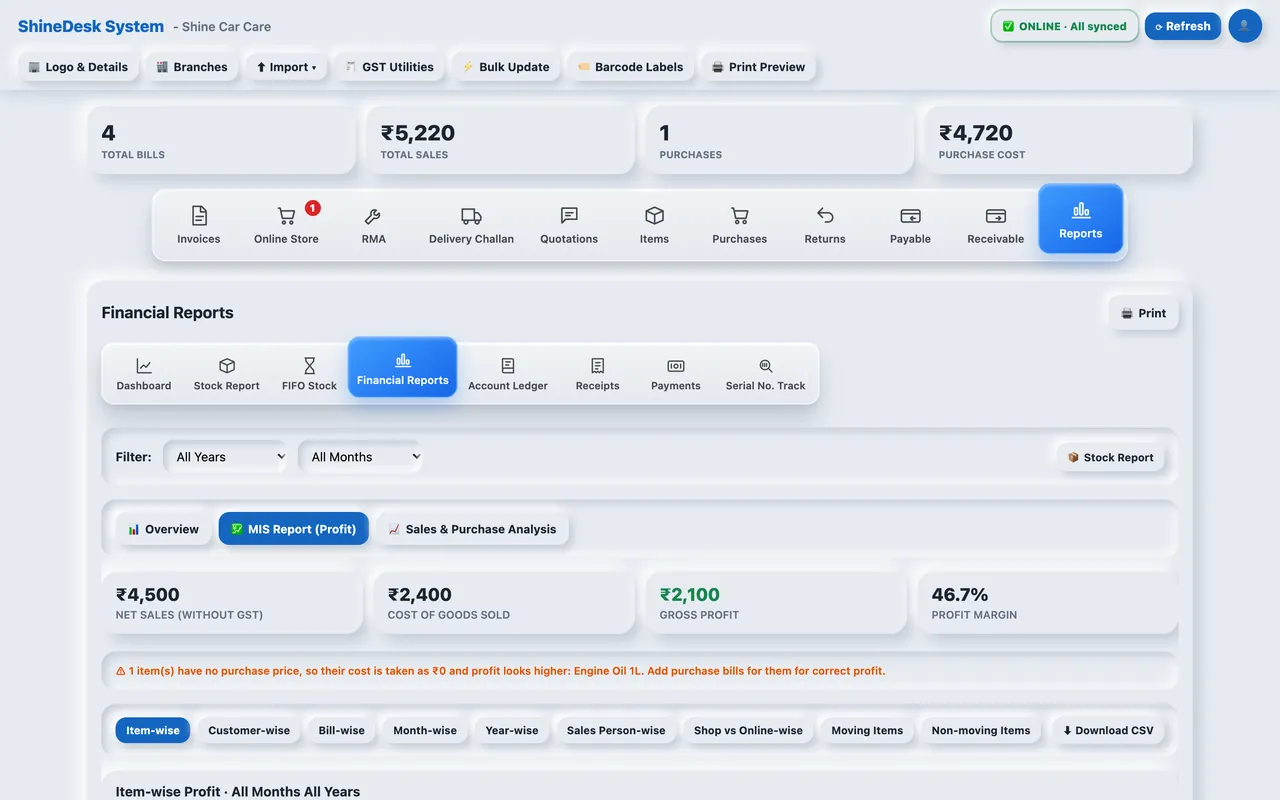
- MIS profit by item, customer, bill, month, year and sales person, with charts and CSV export.
- Repeat customers and dues
- See who comes back, who owes you money, and send them a payment reminder with a pay link.
Invoice, billing and inventory management in one app
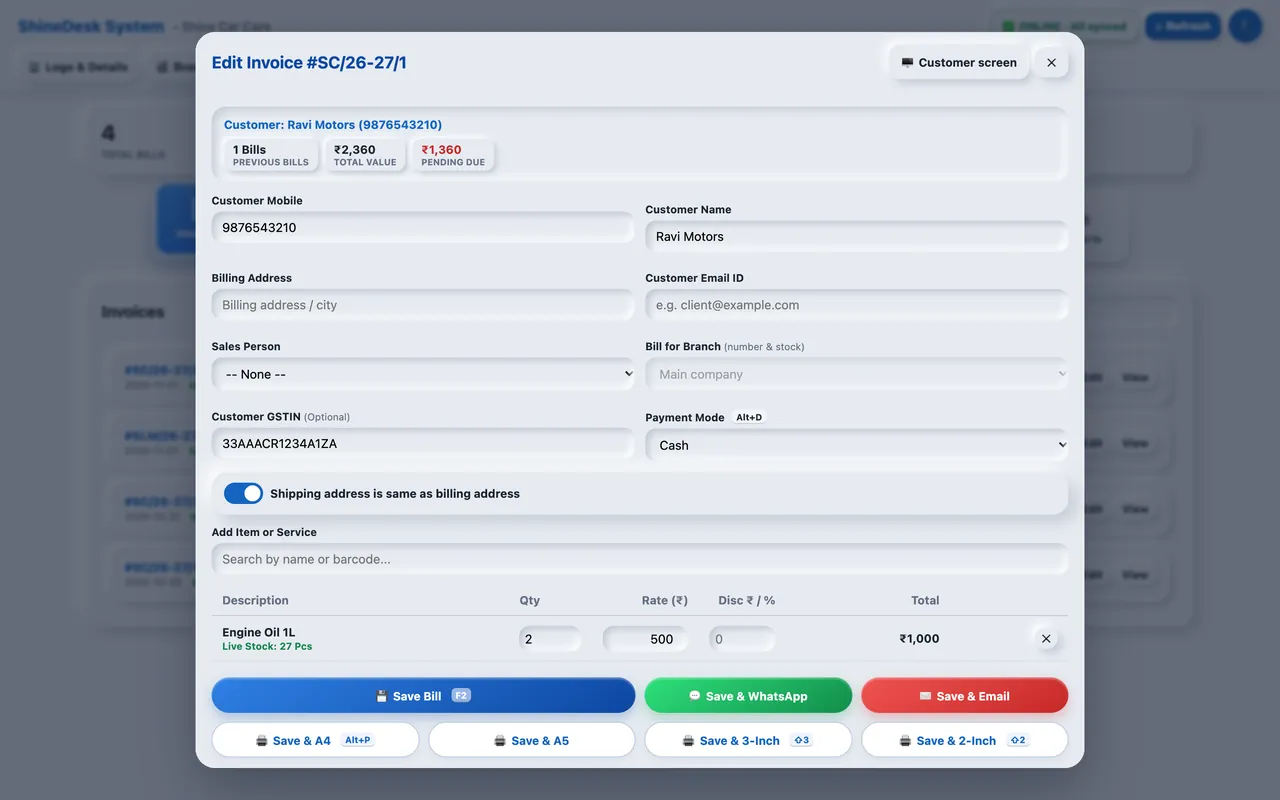
- GST tax invoices
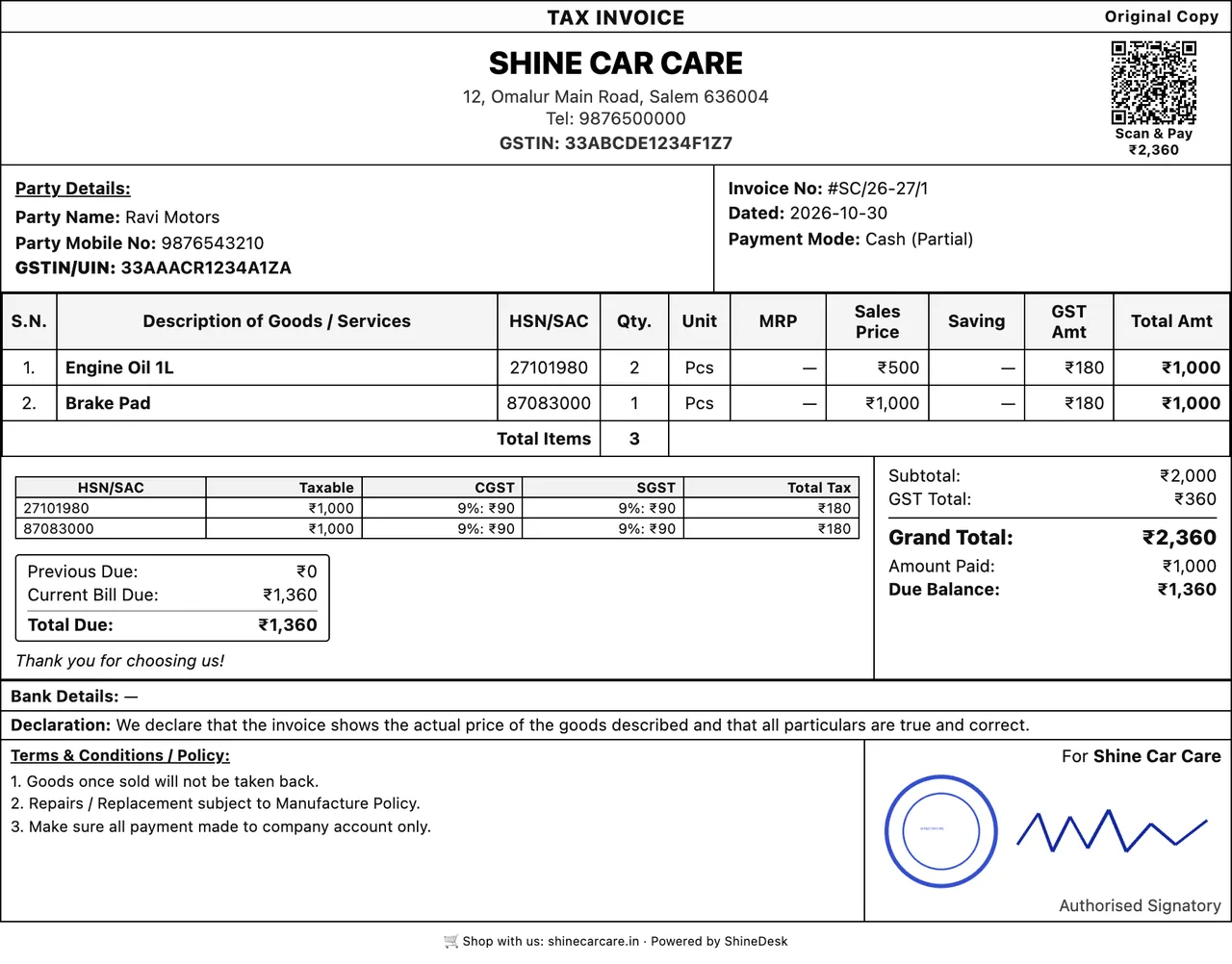
- Your GSTIN and the customer's, HSN/SAC codes with built-in search, CGST and SGST split, and invoice numbers that follow the 16-character GST rule.
- Print any size
- A4 and A5 invoices with your logo, bank details and terms, or 3-inch and 2-inch thermal receipts. A UPI scan-and-pay QR prints on the bill.
- WhatsApp and email
- Send the bill to the customer on WhatsApp in one tap, or email it from your own business email address.
- Stock and purchases
- Enter supplier bills, see live stock while billing, stop bills when stock runs out, and record serial numbers.
- Barcode labels
- Design your own price stickers for label printers or A4 sheets. Items without a barcode get one automatically.
- Dues and ledgers
- Amount receivable from customers, amount payable to suppliers, part payments and a full ledger for every account.
- Profit reports
- Profit by item, customer, bill, month, year and sales person. See fast-moving and non-moving items and repeat customers.
- Many branches
- Each branch gets its own login, bill series, stock and permissions. Transfer stock between branches with a printed note.
See ShineDesk at work
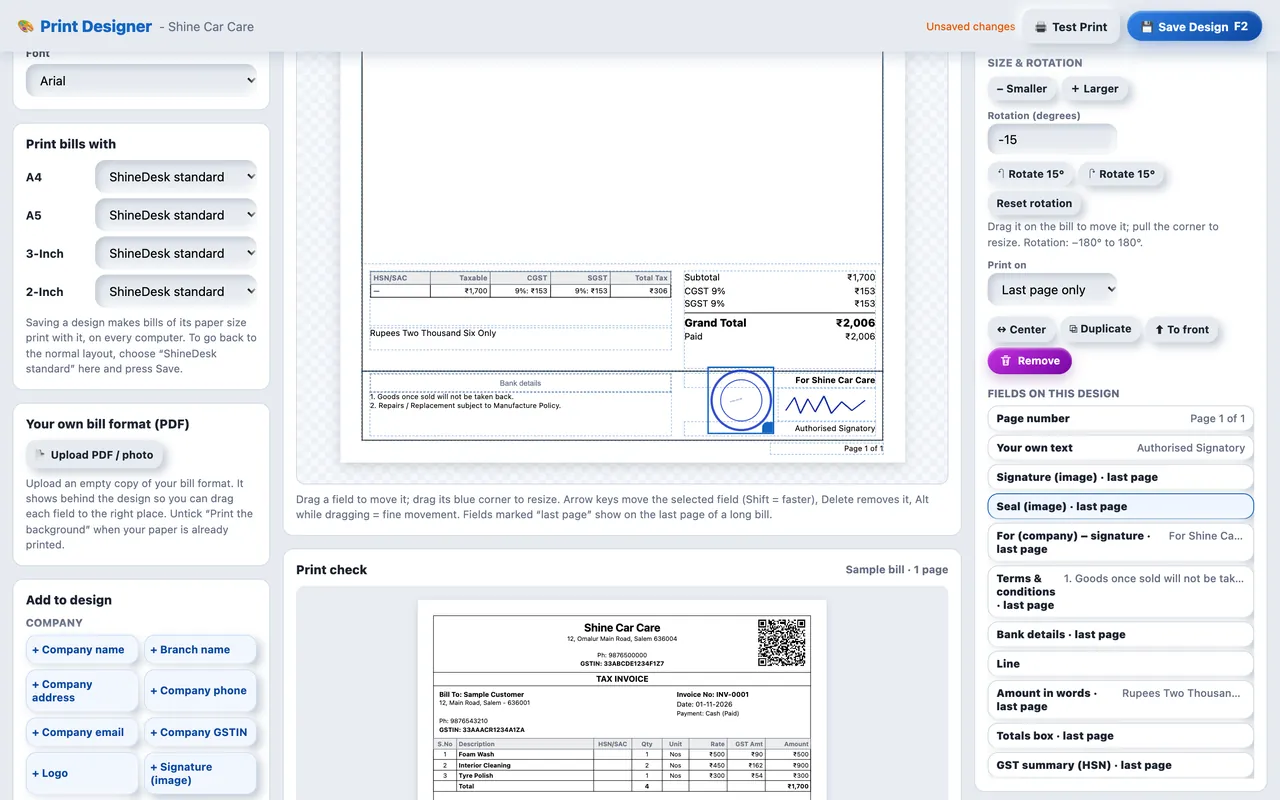
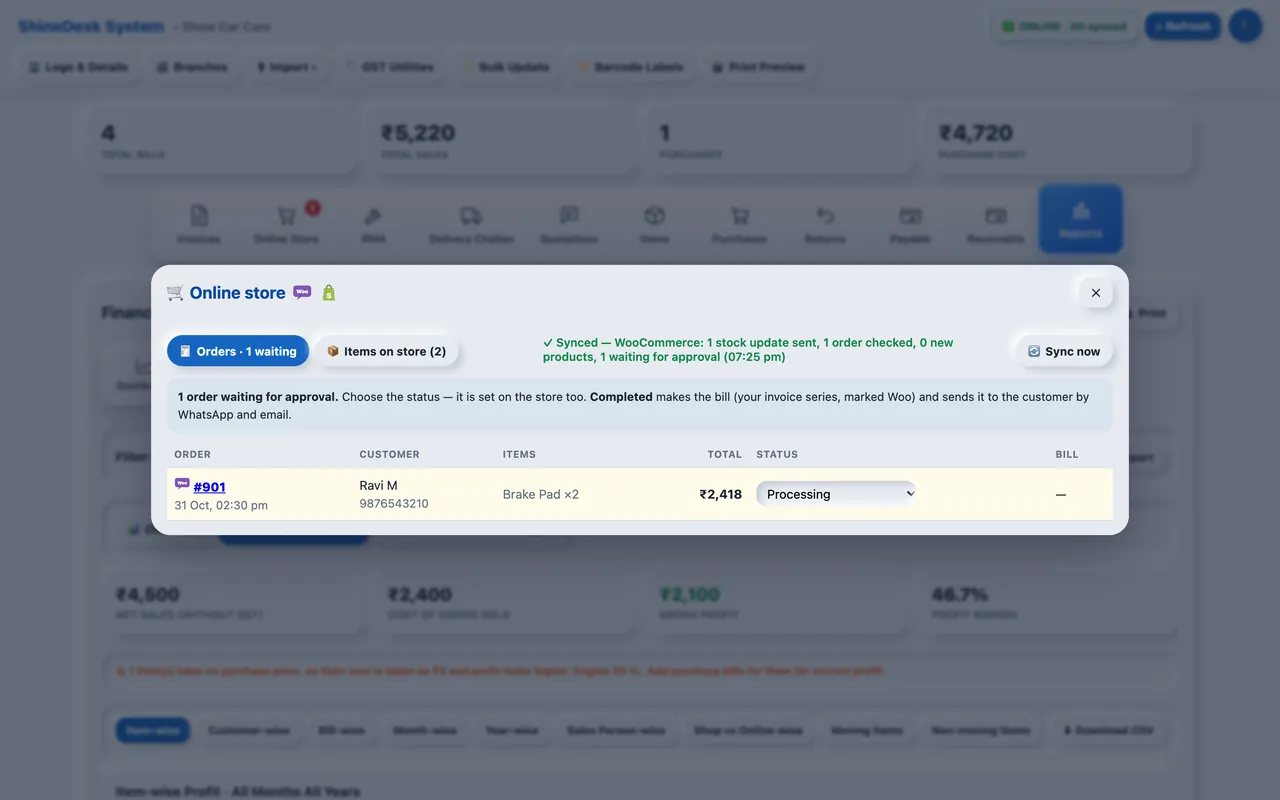
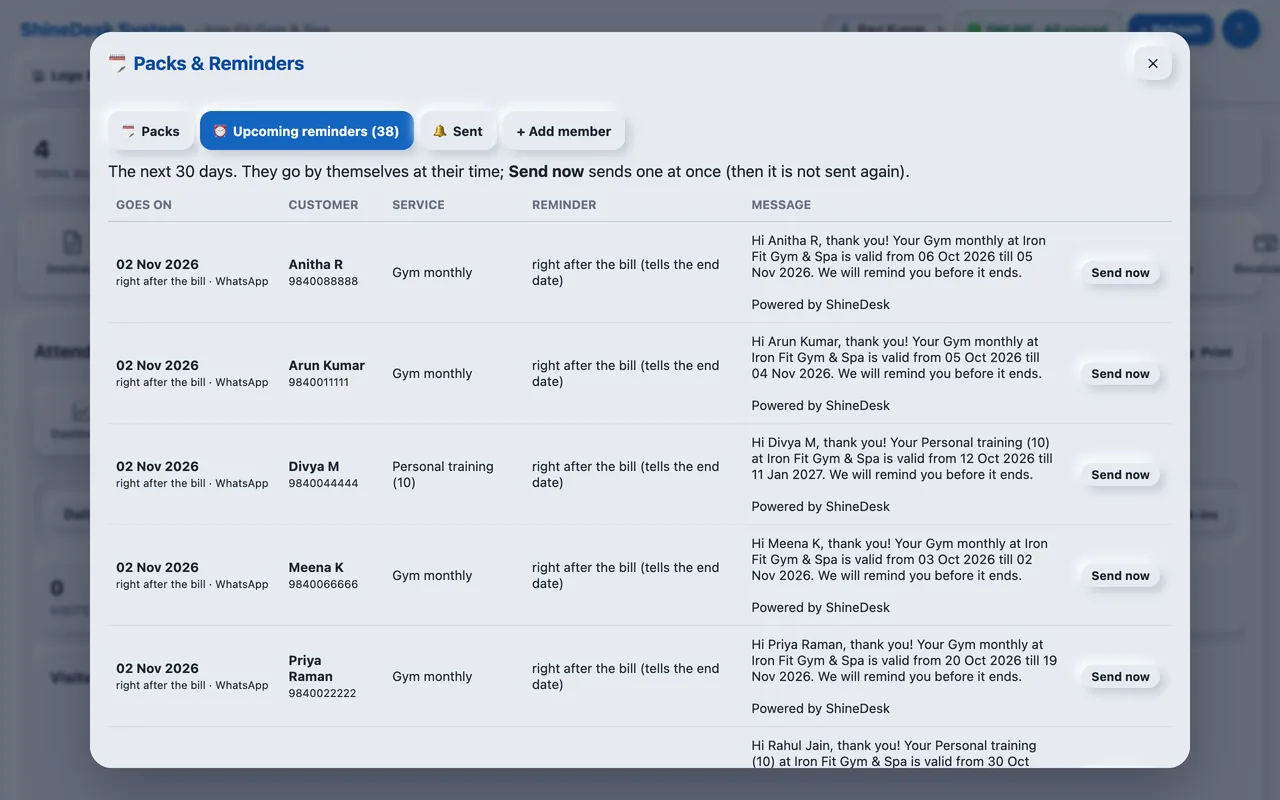
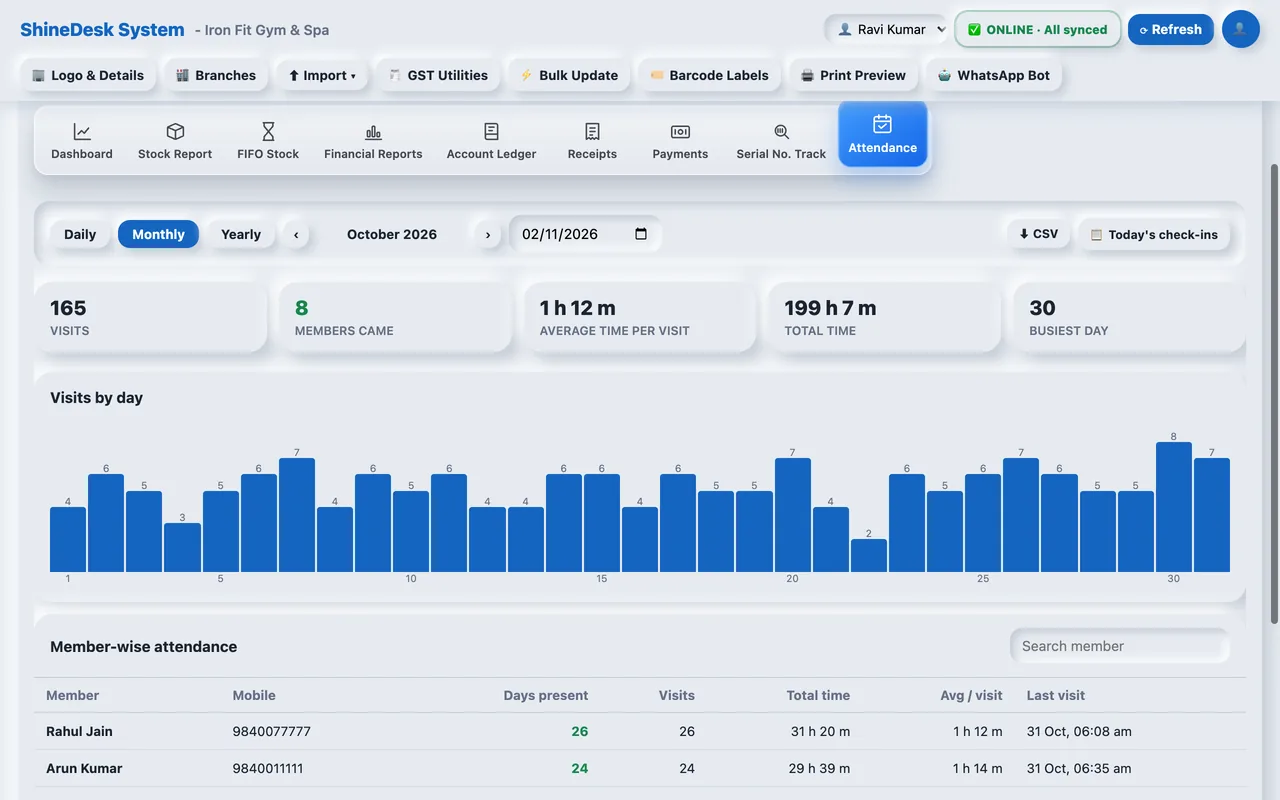
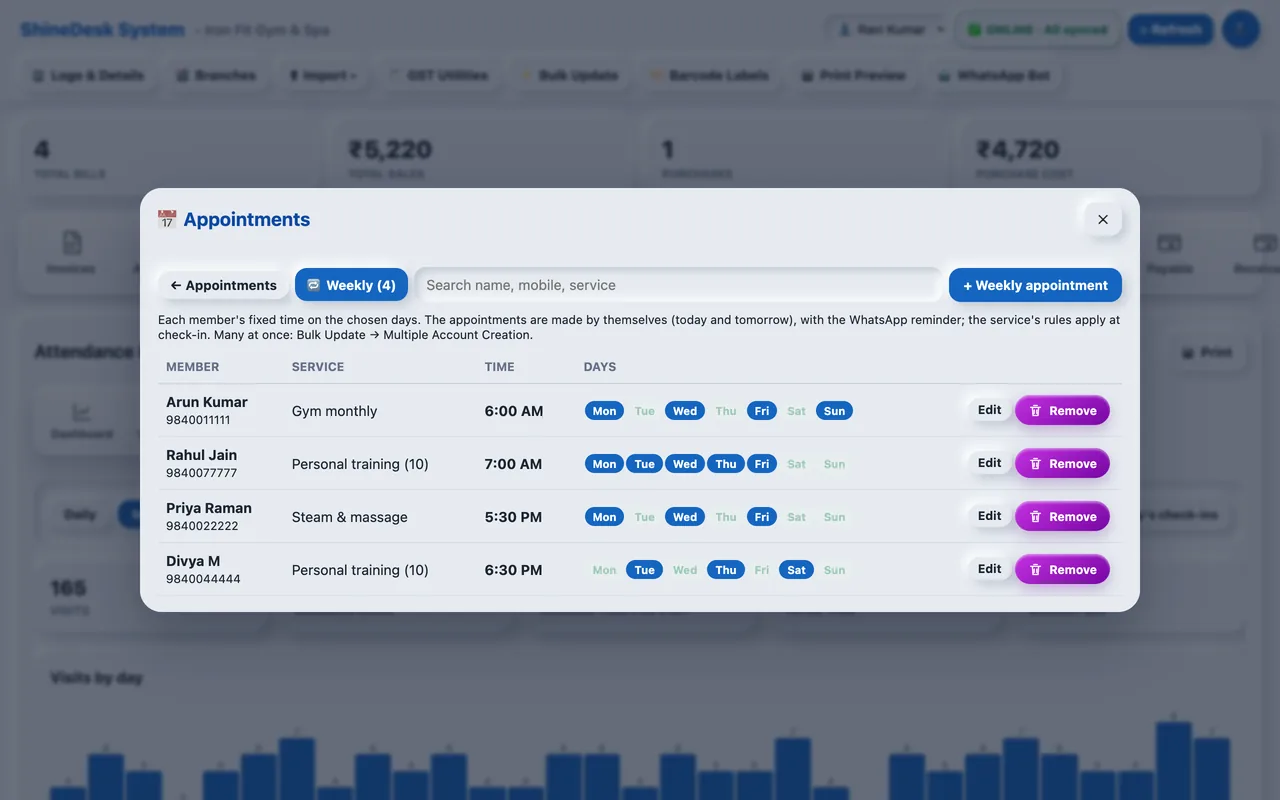
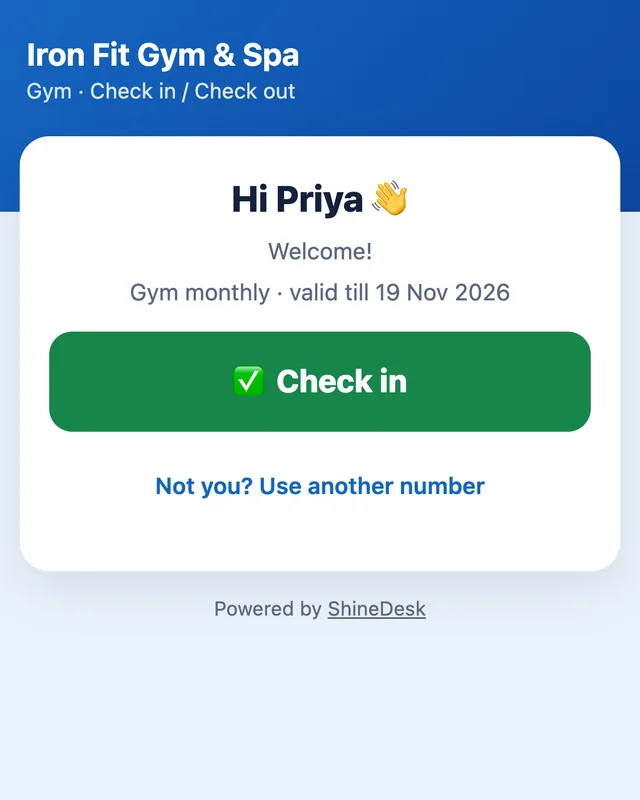
Real screens from the ShineDesk web app. The Android and iPhone apps have the same features.
More in ShineDesk
- Online store sync (WooCommerce and Shopify)
- Connect your online shop. Orders come in every two minutes; you set any status and only Completed orders become bills in your own invoice series. Stock is held while an order is processing and returned if it is cancelled or refunded. Send your shop items to the store in one click.
- Your own bill design, signature and seal
- The Print Designer places every field where you want it, on A4, A5, 3-inch or 2-inch paper, even over your own printed bill format. Upload your signature and seal as PNG pictures; move, resize and rotate them.
- WhatsApp from your own number
- Link your shop's WhatsApp once and bills, receipts, quotations and returns go to the customer as PDFs by themselves — no app switching.
- Due reminders and pay links
- Automatic payment reminders by WhatsApp and email after the days you choose, with a pay link from your own Razorpay, Cashfree, PhonePe, PayU or Paytm account.
- Quotations, delivery challans and returns
- Turn a quotation into a bill, send goods on a delivery challan, and make sales and purchase returns (credit and debit notes) that put the stock back.
- Service requests (RMA) and job cards
- Customers send a repair request from a link; track it through approval, service centre and return. Job cards list the parts and labour and turn into the bill.
- Loyalty points and customer advances
- Customers earn points on every bill and use them on the next one; the bill and the QR show the amount after points. Take advance payments and use them on later bills.
- E-invoice and e-way bill
- Generate the IRN, signed QR and e-way bill from the bill itself. More about e-invoicing →
- Audit log and safe settings
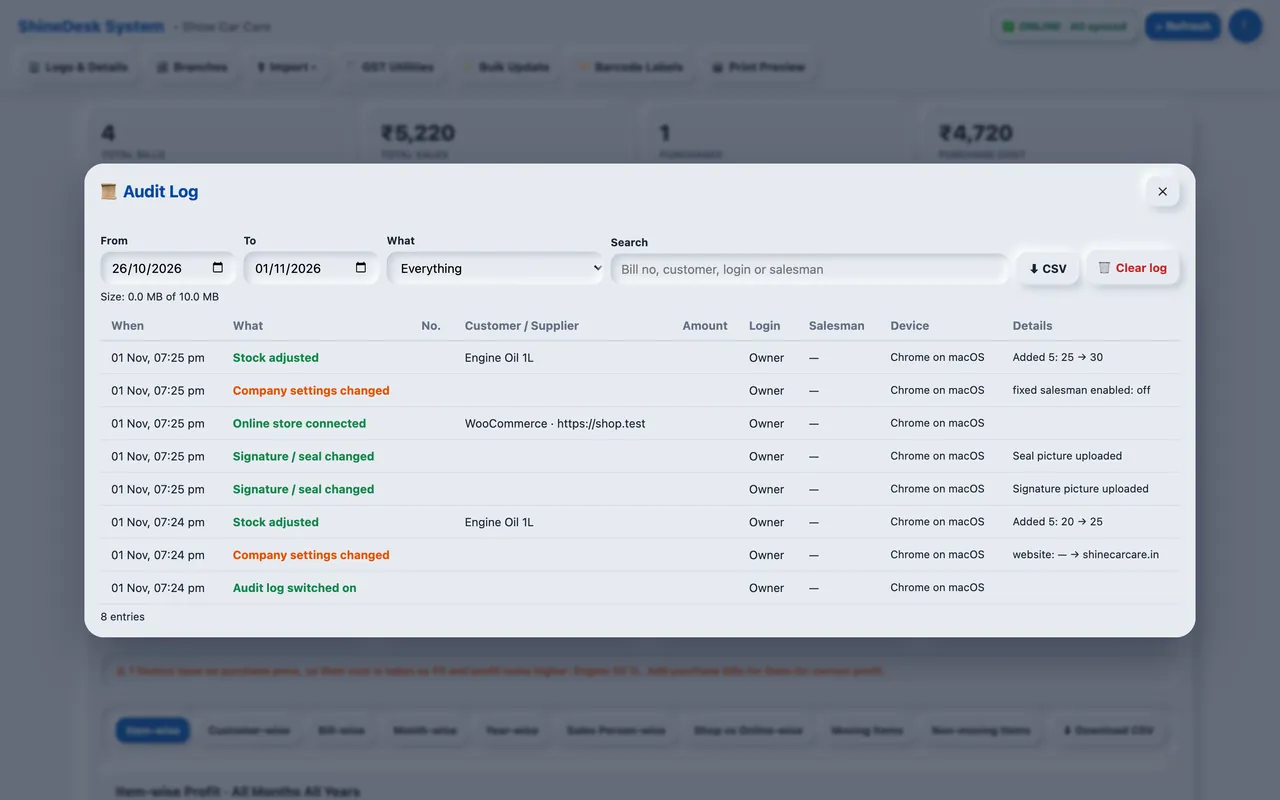
- See who changed what and from which device (up to 10 MB per company). Production Mode asks for an email OTP before important changes, and each company has its own limit of phones and computers.
- Block instead of delete
- An item or account that is already used cannot be deleted by mistake: ShineDesk shows where it is used and lets you block it, so it disappears from billing and reports but your old bills stay right.
- Works when the internet is down
- The web app opens and makes bills offline on a computer it has been used on, and sends them to the server when the line is back. A second backup server takes over if the main one goes down.
- Backup to Google Drive
- Back up your company to your own Google Drive from the app, by hand or automatically at the times you choose.
- One app for every business
- Pick your business type — car care, retail, POS counter, hotel and restaurant, gym, or spa and salon — and ShineDesk switches on the features it needs. One type at a time; other businesses see no change.
- Gym and spa: QR check in / check out
- Print the entrance QR; members scan it and check in or out from their own phone. Packs, visits left and late or early arrival are checked at the door, and the front desk can check members in too. Daily, monthly and yearly attendance reports.
- Rules on service items
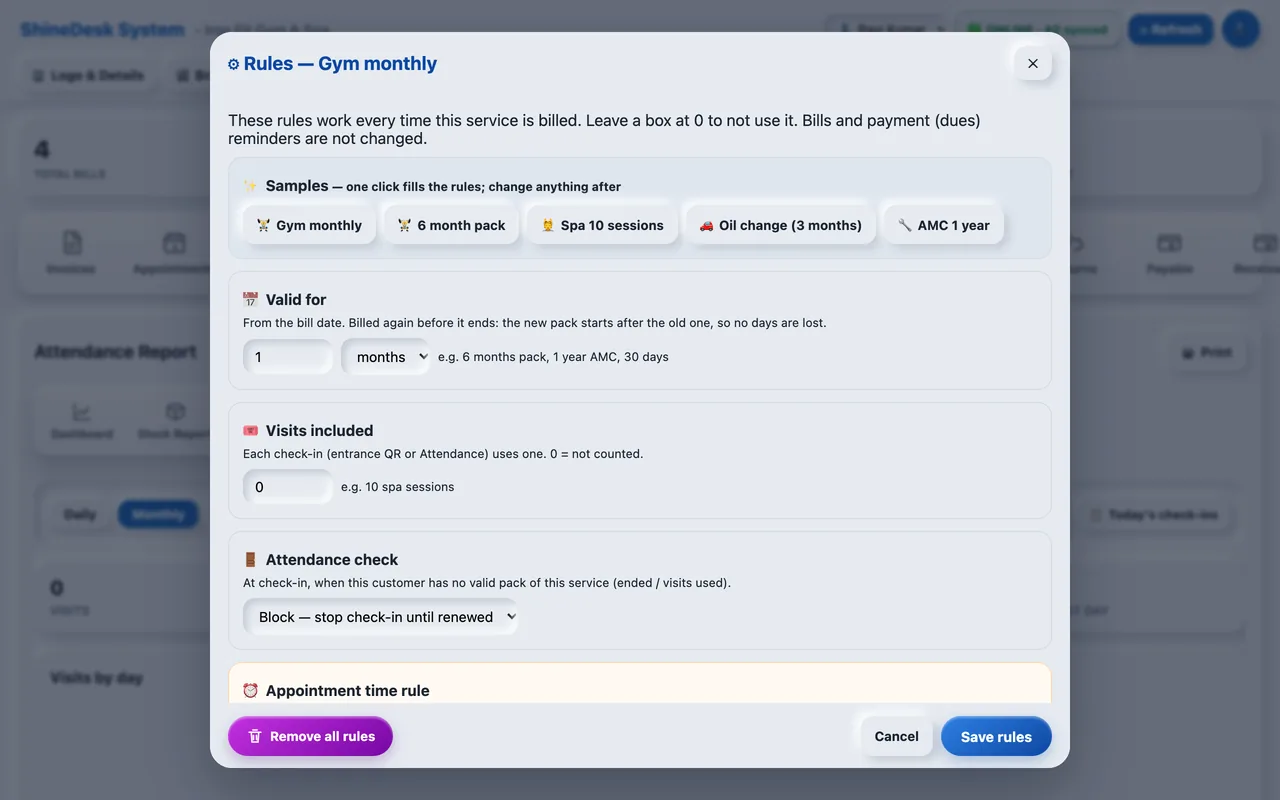
- A 6-month pack, 10 spa sessions, an oil change or a yearly AMC: set how long it is valid, the visits, the attendance check and up to 10 reminders (when, how often, WhatsApp or email, your own message). Packs come from the bill by themselves; renewing early adds to the old end date.
- Appointments that book themselves
- Book one-off appointments, or give a member a weekly time and days with the service — the appointments are made by themselves. The customer is told when it is booked and reminded 10 minutes before.
- WhatsApp assistant (chatbot)
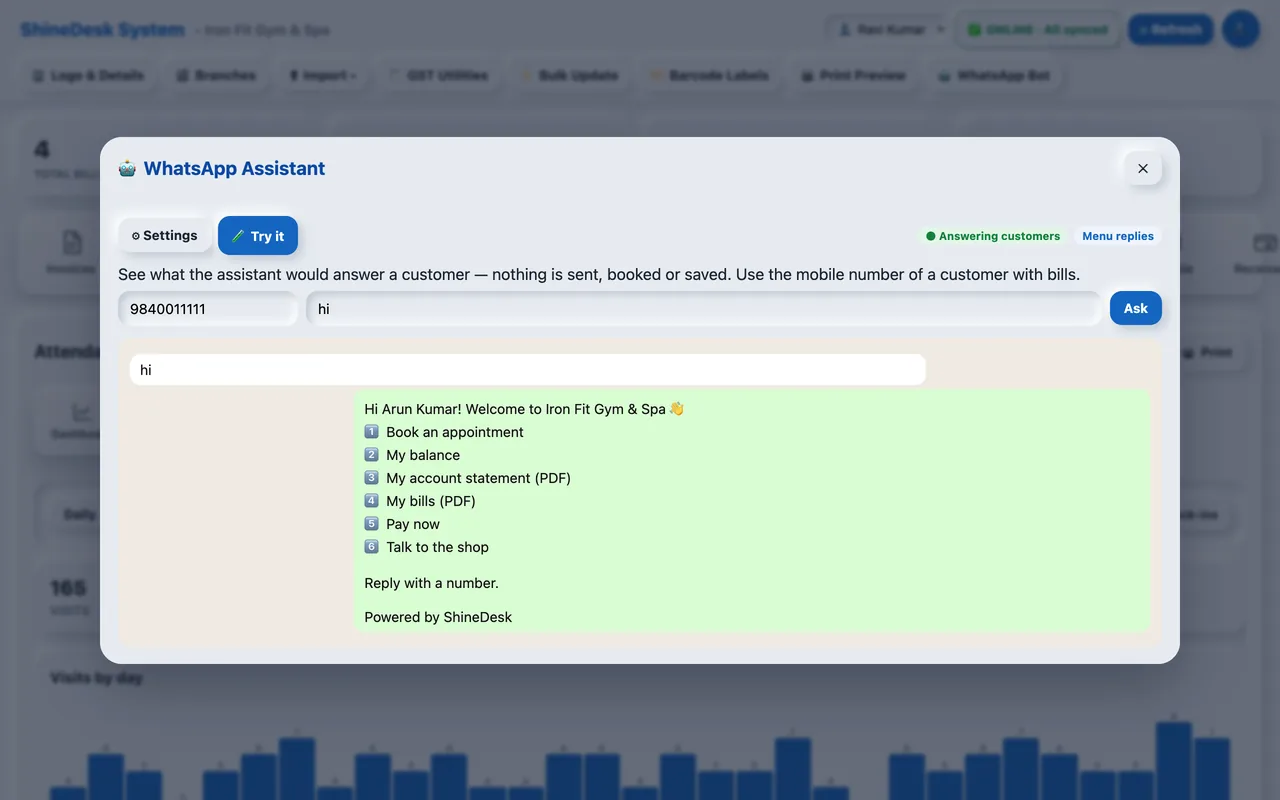
- Customers send “hi” to your WhatsApp and get a menu: book an appointment, their balance with a pay link, their bills 10 at a time (send a bill number to get the PDF) and their account statement. With AI on it understands Tamil, English and Hindi. It only answers saved customers' own accounts and never starts a chat. When a customer asks to talk to the shop, you can reply from the website or the app.
- UPI payments you can verify
- No payment gateway? Customers get your UPI QR in the chat and a page with a Pay now button that opens their UPI app. After paying they send the payment message; ShineDesk checks the amount, the UPI reference and the time, and you approve it in one tap — the receipt is saved with the UPI reference.
- Bills from booked services
- Turn on Auto invoice for a service: when a customer who booked it asks to pay on WhatsApp, the bill is made by itself and the pay link goes out. Customers with many pending bills choose which ones to pay.
- Pack limits and WhatsApp check-in
- Set how many times a pack can be used — say 50 visits in a 6-month gym pack; check-ins and completed appointments both count. Gym and spa members check in and out by sending "check in" on WhatsApp, with a reminder to check out.
Best hotel and restaurant billing software, with KOT and tables
Turn on Hotel and Restaurant mode and ShineDesk becomes a full hotel and restaurant billing system. Every phone and computer of your restaurant sees the same running tables.
- Pick a tableSections like AC hall or rooftop, with vacant, running and billed tables at a glance.
- Send KOT to the kitchenVeg and non-veg tags, cooking notes and a kitchen bell when a new order arrives.
- Settle and printCash, UPI, card or due. The 3-inch bill prints and the table is free again.
Billing app for Android and iPhone, billing software for PC
Bill from the Android or iPhone app at the counter and check reports on the web at home. Everything syncs through the cloud.
Android app
Billing, customers, payments and notifications on your phone. Get an alert when a bill is made or a payment comes in.
Get it on Google PlayiPhone app
The same billing, printing and WhatsApp sharing on iPhone, with the optional glass look.
Download on the App StoreWeb app
Works in Chrome, Edge and Safari. Fast keyboard billing with F2 to save, barcode scanners, imports and reports.
Open the web appWatch how it works
Full tutorial in English or Hindi, or a one-minute video for just the part you need.


Become a ShineDesk partner
Sell ShineDesk to shops and restaurants near you and earn on every renewal.
- Your own partner loginSee every customer you brought, their plan and renewal date.
- You set the renewal priceRenew customers yourself and send them renewal reminders by email.
- Free to joinSign up as a partner →
Moving from Busy, Tally or Excel?
Import your Busy XML (.DAT) or Tally XML backup — customers, items, opening stock and balances first, then your old bills. Excel/CSV files for items, accounts, sales and purchases work too, with sample files to follow. Switching from Vyapar, Busy, Tally or Excel →
Questions people ask
What is the Ultimate Business OS?
ShineDesk calls itself the Ultimate Business OS because it does more than make invoices. GST billing, stock, appointments, WhatsApp messages and chatbot, customer dues and reports all work together in one app, on your phone and computer.
Which is the best billing software for a small business?
The best billing software is one you can use on your phone and computer, that makes correct GST invoices, prints on thermal and A4 printers, shares bills on WhatsApp and keeps your stock right. ShineDesk does all of this in one app, with a free trial of 30 days or 20 bills.
Which is the best hotel and restaurant billing software?
Good hotel and restaurant billing software needs table billing, KOT to the kitchen, takeaway, delivery and room service, and fast 3-inch bill printing. ShineDesk’s Hotel and Restaurant mode has all of these, and every phone and computer in the restaurant sees the same running tables.
Does ShineDesk work on both mobile and computer?
Yes. Use the Android or iPhone app on your phone and the web app on any computer browser. All use the same account, so bills, items and stock stay in sync.
Does it work as POS software for a retail shop?
Yes. Every scan from a USB or Bluetooth barcode scanner adds the item instantly with a beep, unknown barcodes are rejected with a buzz, and F2 saves and prints a 3-inch or 2-inch receipt. The Android and iPhone apps can also scan with the camera.
Does ShineDesk show dead stock?
Yes. The MIS report lists non-moving (dead stock) and fast-moving items, and the stock report flags low-stock and out-of-stock items along with the total stock value.
Can customers pay by card?
Yes. Connect your own Razorpay, Cashfree, PhonePe, PayU or Paytm account. Customers pay by card or UPI from the counter QR or a pay link, and the bill is marked paid automatically.
Can I make GST invoices with ShineDesk?
Yes. Turn on GST and ShineDesk makes tax invoices with your GSTIN, the customer's GSTIN, HSN/SAC codes and CGST/SGST split. Invoice numbers follow the GST 16-character rule.
Which printers does it support?
A4 and A5 laser or inkjet printers, and 3-inch (80 mm) and 2-inch (58 mm) thermal receipt printers. Barcode labels print on label rolls or A4 sticker sheets.
Can I move my data from Busy or Tally?
Yes. Import the Busy XML (.DAT) or Tally XML export: first the masters (customers, items, opening stock), then the transactions. Excel/CSV import is also available.
Can I connect my WooCommerce or Shopify online store?
Yes. Connect your store once and its orders come into ShineDesk every two minutes. You change the order status from ShineDesk, and when an order is Completed it becomes a bill in your invoice series and is sent to the customer on WhatsApp and email. Stock stays in step with the store.
Can I print my signature and seal on the bill?
Yes. Upload your signature and company seal as PNG pictures in the Print Designer on the website. They print above “Authorised Signatory” on A4 and A5 bills, on the web and in the app, and in the Print Designer you can move, resize and rotate them.
Does ShineDesk keep an audit log?
Yes. The audit log records every change in your company — bills, payments, items, accounts, stock, branches, imports and settings — with the login, salesman and device. You can turn it on or off in Company Setup; each company keeps up to 10 MB of history.
Is ShineDesk good billing software for a gym or spa?
Yes. Choose Gym or Spa & Salon as the business type. Members check in and out by scanning a QR at the entrance, packs (monthly, 6 months, 10 sessions) come from the bill with their validity, and ShineDesk sends renewal reminders on WhatsApp and email by itself. Daily, monthly and yearly attendance reports show who came and for how long.
Does ShineDesk manage RMA and repair requests?
Yes. Send the customer a link or let them raise the request on WhatsApp. They add product and serial number photos and the problem by text or voice, and choose branch, courier or pickup. You approve it, track the repair, send it to a service center with a DC slip, and the customer follows it on a tracking page.
Does ShineDesk have a WhatsApp chatbot?
Yes. When a customer sends “hi” to your linked WhatsApp number, the ShineDesk WhatsApp assistant lets them book an appointment and get their own balance, bills (as PDF) and account statement. With AI on it understands Tamil, English and Hindi. It only answers your saved customers' own accounts.
Can it send service and renewal reminders automatically?
Yes. Set rules on a service item — valid for 6 months, 10 visits, a reminder 7 days before it ends, an oil change reminder 90 days after the bill or an AMC renewal reminder — and ShineDesk sends them on WhatsApp or email at the time you choose.
Can customers pay by UPI without a payment gateway?
Yes. The WhatsApp assistant sends your UPI QR and a Pay now button for the exact amount. After paying, the customer sends the payment message; ShineDesk checks the amount, UPI reference and time, and you approve it in UPI to verify. The receipt is saved with the UPI reference.
Is there a free trial?
Yes. Every new account starts with a free trial of 30 days or 20 bills (whichever comes first). Register with your mobile number and email.
Stop managing software. Start managing your business.
ShineDesk – The Ultimate Business OS. Register with your mobile number and make your first bill in a few minutes.
Fast Billing. Smart Automation. Seamless Operations.
Try ShineDesk today*Starting price is subject to plan inclusions and applicable taxes. Features may vary by subscription plan and platform.